
Recommended: Use the Arcade2TV-XR Web Configurator
We now recommend the Arcade2TV-XR Web Configurator for controller remapping and supported firmware upgrades for the Arcade2TV-XR controller, Gen2 wireless dongle, and Haptics PCB:
https://xgameroom.com/arcade2tv-xr-configurator/
You can also find this tool from the home page of shop.xgaming.com.
The web configurator runs directly in a supported browser on Mac or Windows PC, lets users select the desired firmware on the web page, and removes the normal need to download separate firmware files or Windows-only software.
If the web configurator is unavailable, or if support specifically asks you to use the local tool, you can still use the downloadable Arcade2TV-XR software and the manual firmware files listed in this article.
Important: Always choose the firmware for the correct component: Arcade2TV-XR controller, Gen2 wireless dongle, or Haptics PCB. Gen1 dongles are not firmware-upgradable.
⚠️ IMPORTANT – Dongle Version & Firmware Compatibility
Before updating firmware, confirm which wireless dongle you have.
Updating the wrong dongle firmware can permanently disable the device.
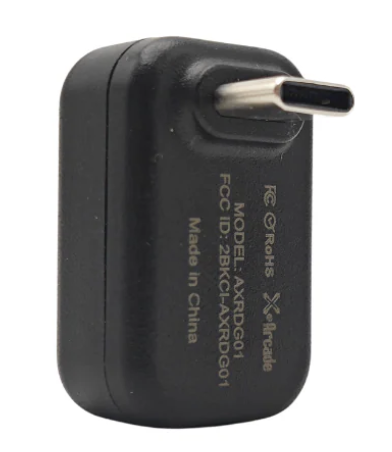
Gen1 Dongle (Original / Stock Dongle)
- This is the dongle that came with your original Arcade2TV-XR / Tankstick VR purchase.
- It is included with standard bundles.
- It is NOT firmware upgradable.
❌ Do NOT attempt to install Gen2 dongle firmware (v3.xx) onto a Gen1 dongle.
Doing so will permanently disable the dongle.
Gen2 Dongle (Purchased Separately / Haptics Kit Included)
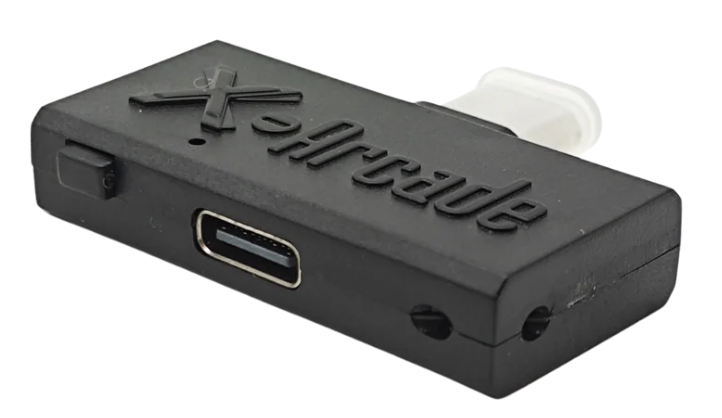
- Purchased separately as an upgrade
- Included with the X-Force Haptics Kit
- Supports firmware upgrades
- Required for v3.62 / v3.64 controller firmware systems
Only Gen2 dongles can be updated using the firmware tool.
Quick Identification Rule
If your dongle came with your original Arcade2TV-XR bundle → You have Gen1
If you purchased a wireless upgrade or Haptics Kit → You have Gen2
When in doubt, contact support before upgrading.
Updating Arcade2TV-XR Firmware on macOS (Intel & Apple Silicon)
If you’re using a Mac and need to update your Arcade2TV-XR / Tankstick VR firmware, follow the options below.
Option 1 - Arcade2TV-XR Web Configurator (Recommended)
You can now update supported firmware and remap the Arcade2TV-XR directly from your browser on Mac or Windows PC.
Arcade2TV-XR Web Configurator:
https://xgameroom.com/arcade2tv-xr-configurator/
Supported:
✅ Arcade2TV-XR / Tankstick VR controller firmware
✅ macOS (Intel & Apple Silicon – M1, M2, M3)
✅ No Windows installation required
Not Supported:
❌ Gen1 dongle firmware (Gen1 cannot be upgraded)
Important:
- Connect directly via USB (USB hub works).
- Do NOT unplug during upgrade.
Cross-Platform Web Configurator Notice
Recommended: Use the current Arcade2TV-XR Web Configurator first. It is cross-platform for Mac and Windows PC and supports the Arcade2TV-XR controller, Gen2 wireless dongle, and Haptics PCB firmware workflows.
If the web configurator is unavailable, use the downloadable software fallback or contact Xgaming Support for help.
Option 2 – Intel Mac with Boot Camp
If you have an Intel-based Mac:
- Install Windows using Boot Camp
- Boot directly into Windows (not a virtual machine)
- Run the Windows firmware tool
This method works because Windows has direct USB access.
Not Supported
The following will NOT work for firmware upgrades:
- Parallels on M1 / M2 / M3
- VMware on Apple Silicon
- Crossover / Wine
- Any virtual Windows environment on Apple Silicon
If the tool says “No device found” inside a VM, this is expected.
Summary
Gen1 dongle → Never upgrade firmware
Gen2 dongle → Upgrade only when required
Mac users → Use Web Firmware Updater
Intel Mac → Boot Camp works
No computer → Pre-flashed board available
If unsure, contact Xgaming Support before updating.